
Shipserv | Supplier Logo

Carnival Cruise Line is now using ShipServ for its procurement & order management.

Your buyer, Carnival Cruise Line, requested us to set you up on the ShipServ Platform to enable your continued trading with them

Trusted by marine suppliers across the world

400+ buyers operating over 12,000 vessels

About ShipServ

How can we benefit you

ShipServ is the leading global marine trade platform. We connect buyers and suppliers, simply and securely to drive business opportunities and sustainable growth. Our Trade Platform makes trading simple by enabling buyers to discover both the products they need and the right supplier to provide them. The Trade Platform facilitates the whole buying process from discovery, through quoting to delivery and invoicing.

ShipServ Trade Platform

Our Trade Platform is built to enable buyers to find your products and purchase them from you in a frictionless process. All documents, communications and transaction statuses are centralised for ease of management and two way visibility.

Free Platform

Our Trade Basic Platform is completely free for suppliers to manage their transactions. However if you want even more functionality, you can upgrade to our Trade Business Platform.

Marketplace

Improve your reach and market yourself to our 400+ buyers and over 12,000 vessels.

Your Next Steps

Sign up here for your free trading account

Frequently Asked Questions

What are next steps?

The first two required steps to access transactions are:

  • Sign up for a free trading account/TradeNet ID, by filling in our sign-up form.
  • Person responsible for account registers as admin, by clicking the "Register an admin" button in the email sent to your trading email address.

How do I add additional users?

Invite additional users and/or Admins easily

How do I manage transaction settings such as default currency, email notification preferences, change the trading email, etc.?

Manage your Trade settings by logging in as an Admin and following the guide here

How do I set up my free Basic Profile/Listing?

Please review our help article "Manage your Basic Profile Content" to learn what important information to include as well as how to add it.

How do I access information such as videos, help articles and chat with the ShipServ support team?

ShipServ's Intercom (accessed via the blue and white smiling logo in the lower right corner) is your link to a wealth of platform information and live chat. Please visit our Intercom help article and video to learn more.

How do I quote RFQs and confirm POs?

Please review our help article "Quoting RFQs and Confirming POs in Trade Basic" to learn the basics of transacting.

Helpful Links

Discover more on the ShipServ platform and how you can get up to speed quicker with these three links
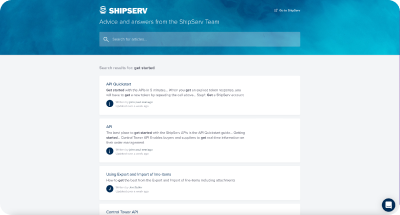
ShipServ Help Centre
The ShipServ Help Center is the home of self-service help and support, where you will find help articles, FAQs and how to videos.
Product Roadmap
Discover what new features we are currently working on and give your vote on features that are currently under consideration.
News & Insights
Read the latest news, watch our latest webinars and discover more
About
Support
IMPA
TradeNet
Terms of Use
Privacy Policy
Cookie Policy

© 2026 ShipServ Limited